A digital business card for field sales reps
For a field sales rep, a digital business card has to do four things: share in a few seconds, save to the contact’s phone, bring back their details through a form, and send the lead to the right rep. For the sales manager, it also has to be managed for the whole team from one place.
For the full picture, read the complete guide: how digital business cards work.
A field sales rep’s day
A field rep meets people all day, rarely at a desk: at a client’s site, in a shop, at a trade show, on the road. They meet ten people, see two again and write down the rest when they remember.
Three problems come up again and again.
- The contact gets lost. A paper card ends up in a pocket, the prospect’s details in the rep’s head.
- The context fades. The prospect’s need, their timeline, the promises made: all forgotten by the evening.
- The CRM arrives late. Data entry happens on Friday, or never.
A digital card does not solve all of this on its own. It fixes the first point and opens the way for the other two, as long as the lead it brings back arrives qualified. Piktechs is the layer between your reps and your CRM: capture, qualify, sync. Reps can keep handing out paper cards if they like. The digital card is one more way to capture a contact.
Content of a field rep’s digital business card
A rep’s card is not a CV. It does one job: let the prospect get back to you and let you get back to them. Keep a few elements, well chosen.
- Name, photo and job title. The photo helps people remember you among the ten meetings of the day.
- One direct way to reach you: phone, email, a booking link.
- One line on your offer, with the company logo.
- A short form: name, email, one or two qualification questions.
- A save-contact button that adds name, photo, job title and links to the phone.
Avoid lists of fifteen links. The more choice, the fewer clicks. To compare products before you pick one, see the 12 criteria for a digital business card.
A typical day with the card
Here is a rep’s day, with the card’s role at each step.
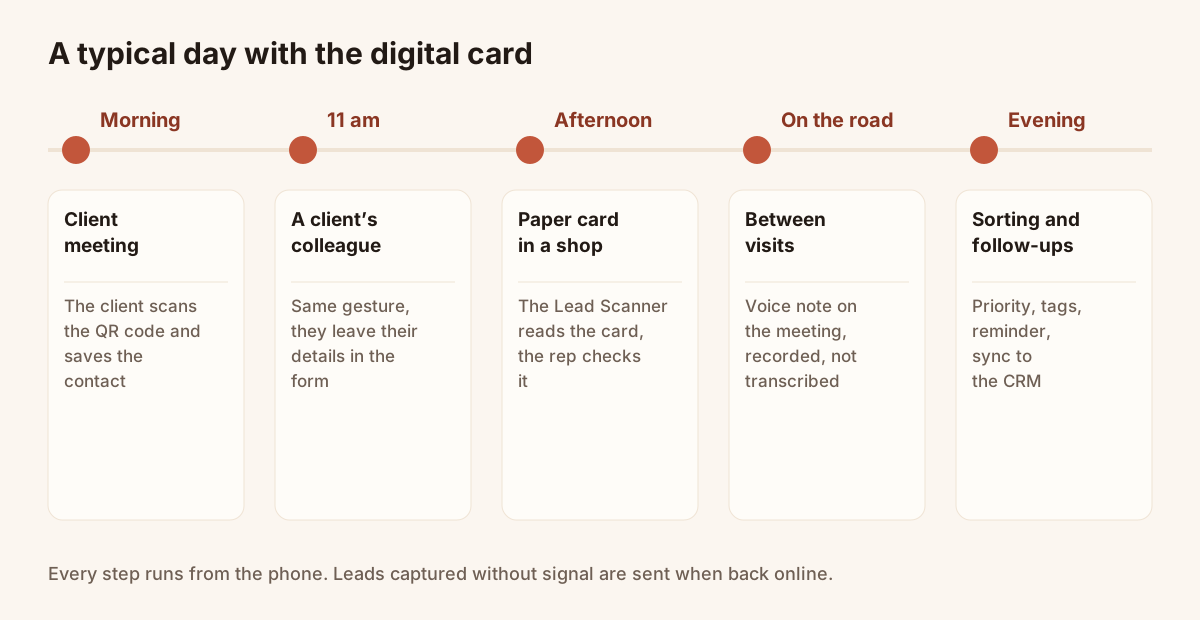
A typical day, from the first meeting to the evening follow-up.
| Moment | Situation | Role of the card |
|---|---|---|
| Morning | Meeting at a client’s site | The rep shows the QR code. The client saves the contact in one tap. |
| Late morning | Meeting a colleague of the client | Same gesture, no paper card to look for. The colleague leaves their details in the form. |
| Early afternoon | A paper card handed over in a shop | The Lead Scanner reads the photo of the card. The rep checks and saves. |
| Between visits | In the car | A voice note about the meeting. It is recorded, not transcribed. |
| End of day | Sorting and follow-ups | Priority, tags, follow-up reminder. Leads go to the CRM. |
This flow also works without signal: leads captured offline stay on the device and are sent when the connection returns. The rep does not have to wait to carry on.
Sharing in meetings and at trade shows
In a meeting, one gesture is enough. The rep opens the card on their phone and has it scanned, or shares the link in the conversation. The client sees it in their browser, with no app to install. If the client’s phone reads NFC, sharing can be a tap, but keep the QR code as the fallback.
The card also fits into the email signature: every message sent becomes a way into the card, with no extra effort.
At a trade show the logic is the same with more volume. A QR code on the stand leads to the card while reps scan the paper cards they are handed. The article on collecting leads at trade shows details the methods.
Getting the contact back
The form changes the whole exchange. Without it, the rep gives their details and waits for a call. With it, the prospect leaves their name and email and answers a few questions: budget, timeline, who decides. The answers arrive on the record with the date and the source, here "via your card".
The form is part of the Pro and Team plans. GDPR consent is recorded with each lead and data is hosted in the EU. Keep the questions few: three are almost always enough, and every extra field loses answers.
Follow-up and reminders
A card that brings back a lead is only worth something if someone calls back. In Contacts, the rep can:
- set a high, medium or low priority;
- add tags, such as the show or client name;
- write a note or record a voice note;
- set a follow-up reminder with a date and a reason.
Their next day starts with the list of today’s follow-ups. Leads then sync to HubSpot or Odoo, or to another tool through Zapier and Make. With no CRM, Contacts and the CSV export are enough to work. How it works is described on the mobile CRM page.
Managing the whole team’s cards
For a sales manager, the question is no longer one person’s card but ten.
- A shared card pool: you assign cards from one place and add users at any time.
- A locked brand: same logo, colours and layout on every card. Change a job title or a design and every shared card updates.
- Your own domain, for example cards.your-company.com.
- Roles and permissions per group or team.
- Lead assignment: each lead goes back to the rep who shared their card.
- Reassignment on departure: the card moves to another member.
The Team plan costs EUR 15 per seat per month, with a 3-seat minimum and 5 cards per seat. A 14-day trial lets you test it with the team. Details are on the digital business cards page and the pricing page. For rollout, start with a small group of willing reps, let them use the card for a few weeks, then extend to the whole team.
One last point: Piktechs does not sell a physical NFC card and does not read organiser badges. If your team needs that at a trade show, it keeps the organiser’s scanner alongside.
Frequently asked questions
Does a digital card replace a rep’s paper card?
No, and that is not the aim. A rep can keep handing out a paper card. The digital card is one more way to share your details and get the other person’s.
What should a field rep’s card contain?
Name, photo, job title, one direct way to reach them, one line on their offer, a save-contact button and a short form so the prospect can leave their details.
How do you keep the leads of a rep who leaves?
On a team plan, leads stay in the company workspace and the card can be reassigned to another member. Nothing leaves with the person.
Do reps need signal to capture a lead?
Not for entry: leads captured without signal stay on the device and are sent when the connection returns. The prospect does need a connection to open the card.
Do the leads reach our CRM?
Yes for HubSpot and Odoo, natively. There is no native Salesforce connector: you go through Zapier or Make. A CSV export is always possible.
Read next
 Guide
How Do Digital Business Cards Work? QR Codes, NFC, Links and vCards Explained
QR code, NFC, link or vCard: see how digital business cards work, how contacts get saved on iPhone and Android, and how leads follow.
 Article
Are Digital Business Cards Worth It? Costs, ROI, Pros and Cons
Paper vs digital business cards: costs, a method to work out ROI with your own numbers, pros and cons, and who should switch.
 Article
What Is a Digital Business Card? The Complete Guide
Definition of a digital business card, how it works and how it compares to paper. Plus how to create your own free card in minutes.
 Article
Are Digital Business Cards Safe? Privacy, Security and GDPR
Check the data a digital business card shares, who can see it, and how to stay GDPR compliant when you collect leads with a card or a QR code.
 Article
How to Create a Digital Business Card on Android
Create a digital business card on Android with the Piktechs app or your browser, share it by QR code, link or NFC tag and keep the contacts you meet.
 Article
How to Create a Digital Business Card on iPhone
Create a digital business card in Safari on your iPhone, add it to the Home Screen and share it by QR code, link or NFC tag. No app needed.
Equip your team before the next show
Team gives each rep cards, forms and Lead Scanner, with lead assignment and CRM sync. 14-day trial.