Are Digital Business Cards Worth It? Costs, ROI, Pros and Cons
Are digital business cards worth it? For most people who meet clients, yes: a free card costs a few minutes, stays current after a change of number and can capture the other person's details too. They are not worth it if you hand out a handful of cards a year and never change role.
The mechanics are in our guide to how digital business cards work. This article looks at the money, the gains, the drawbacks and a method to decide with your own numbers.
Are digital business cards worth it?
The honest answer depends on three questions.
- How many people do you meet for work? The more, the more a card that is cheap to share and easy to follow up pays back.
- How often do your details change? Each change on paper means a new print run. On a digital card, it means one edit.
- Do you act on the contacts? A card has value when someone is contacted afterwards. A pile of cards in a drawer, paper or digital, has none.
If you answer "many", "often" and "yes", the switch is easy to justify. If you answer "few", "never" and "rarely", keep your paper cards and add a link to your email signature.
We say plainly that the saving on paper is not the main gain. The value comes from leads you capture and follow up, and from details that stay correct. Paper saved is a side effect.
The cost of a paper business card
Paper cards cost money in several lines. We give no price here, because print prices vary by country, printer, quantity, paper and finish, and an invented figure would mislead you. Ask for a quote and fill the lines in yourself.
- Design. A one-off cost if a designer does it, or time if you do it yourself.
- The print run. A price per batch, usually lower per card at larger quantities.
- Reprints. Every change of title, phone number, email or address means a new batch, and the old stock goes unused.
- Delivery. Shipping, or a trip to pick them up.
- Waste. Cards never handed out, or handed out and not kept.
- Time. Typing the cards you receive into an address book or a CRM, one by one.
For a team, add the same lines for each person, plus the work of keeping the look the same across all cards.
The cost of a digital business card
A digital card replaces the print lines with a software line. With Piktechs, the figures are these:
| Plan | Price | Live cards | Good fit |
|---|---|---|---|
| Free | EUR 0 | 1 | One person who wants a card and a QR code |
| Pro | EUR 9 per month, or EUR 84 per year | 5 | A person who captures contacts, with forms, Contacts, the Lead Scanner and analytics |
| Team | EUR 15 per seat per month, 3 seats minimum | 5 per seat | A sales team that needs one brand, roles and lead assignment |
Pro and Team come with a 14-day trial. The yearly Pro price of EUR 84 compares with EUR 108 over twelve months at the monthly price. The Team minimum is three seats, so EUR 45 per month for the smallest team. The Team plan adds a brand kit, your own domain, roles and lead assignment. The pricing page holds the current figures.
The other costs of a digital card, stated without a number:
- Your time to set it up. A few minutes for a first card, longer for a team with a brand kit.
- A tag or card for NFC, if you want one. Piktechs does not sell a physical NFC card. You can link a tag or card you already own, bought from a third party at its own price.
- Some paper, still. Many people keep a few paper cards with the QR code printed on them.
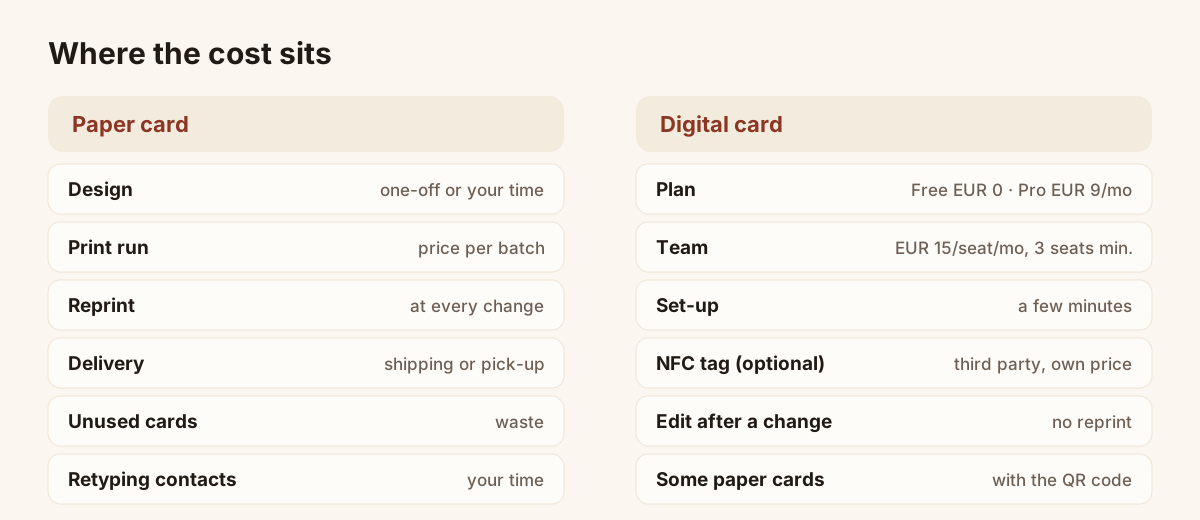
The same card, two sets of cost lines.
How to work out the ROI with your own numbers
Return on investment for a business card is not about paper saved. It is about contacts that become conversations. Here is a method you can apply in an afternoon, with figures from your own activity. We give no sample result, because it would be invented.
Step 1: write down your costs for twelve months.
- Paper: design, print runs, reprints, delivery, taken from your last invoices.
- Digital: the plan you would pick, over twelve months, from the table above, plus any NFC tag you would buy.
Step 2: count your contacts. Take a typical month. How many people did you meet for work? How many gave you a card, or took yours?
Step 3: count the follow-ups. Out of those meetings, how many led to a message, a call or a quote? Check your email and CRM. If you cannot tell, that is the first finding: the contact left no trace you can act on.
Step 4: estimate the value of one follow-up. Use your own figure: the average value of a deal, a quote or a booking, and the share of follow-ups that become one. Use the figures from your CRM, not an industry average.
Step 5: estimate the gain from the card. A digital card can change three things. Test each against your own activity:
- more people reach you after the meeting, because the card is saved in one tap and the link stays in their messages;
- more contacts are captured, because the person leaves their details in a form;
- fewer errors, because your details stay current and the leads reach the CRM without retyping.
Step 6: compare. Gain from one extra follow-up per month against the cost line from step 1. If one additional conversation a month more than covers the cost, the card pays for itself. If you cannot imagine even one, stay on the Free plan or stay on paper.
The method is deliberately simple. It also shows that the break-even point is low for a card on the Free plan, and that the Pro and Team decision rests on the leads you capture, not on the card itself.
Pros of a digital business card
- Details stay current. An edit goes live at once. The QR code, the link and the NFC tag keep pointing to the same card.
- Nothing to install for the other person. The card opens in a browser, and the contact saves your details in one tap.
- More room. Photo, logo, links, booking page, presentation.
- Many ways to hand it over. In person by QR code or NFC tap, by message, on screen in a video call, in your email signature.
- A return channel. With a reply form on the card (a Pro and Team feature in Piktechs), the person you meet can leave their details, with their consent recorded.
- Follow-up. Contacts land in a list you can qualify, with a priority, a note or a voice note, and export. HubSpot and Odoo connect natively, other tools through Zapier or Make, and a CSV export is always available.
- Consistency for a team. One brand kit, one layout, roles, and leads assigned to the right rep.
- Fewer reprints. One new role does not mean a new print run.
Cons of a digital business card
- It needs a phone. If the other person has no phone at hand, you need a paper card.
- It needs a network. A page does not open without a connection. In a hall with poor coverage, the QR code on a paper card helps.
- NFC is not universal. Older phones do not read tags. The QR code is the fallback.
- Some people expect paper. Offering both costs little.
- It adds a tool to manage. A card is one more account and one more thing to keep current. On a team, someone has to own it.
- Privacy duties. A card that collects details must state the use of those details and record consent. On Piktechs, consent is recorded with each lead and the data is hosted in the European Union.
- No import of a contact list. Piktechs does not import a contact CSV. It exports one, without phone, priority, tags or notes columns.
Can I use my phone as a digital business card?
Yes. A digital card is built for a phone. Three ways to use the phone itself:
- Show the QR code on your screen. The other person scans it with their camera. No app on their side.
- Send the link. In a message, an email or a chat during a call.
- Tap, with an NFC tag or card. Recent iPhone and Android phones read NFC tags. Link your tag to your card, and the other person taps to open it.
Two cautions. On Android, Piktechs has an app on Google Play. On iPhone, there is no App Store app, and Piktechs runs in the browser. And a phone with an empty battery shares nothing, so keep a few paper cards in the bag, with the QR code printed on them.
Who should switch, and who can wait
Switch if:
- you meet people for work every week;
- your title, phone number or company changes from time to time;
- you work in a team that wants one look and one place to see every lead;
- you attend trade shows or events and need a quick way to capture contacts.
Wait, or stay on paper, if:
- you hand out a few cards a year and your details never change;
- your contacts are in sectors or places where a phone at a meeting is not welcome;
- nobody follows up on the cards you collect, so a digital list would sit unused.
Either way, try the Free plan first. One live card costs nothing, and a week of use tells you more than a comparison page. To weigh up several products, see how to compare digital business card apps.
Is the term still new to you, and would the pillar definition help?
You can create your free card on Piktechs and keep your paper cards alongside it.
Frequently asked questions
Are digital business cards worth it for a small business?
Often, yes. A free card costs nothing, and the plan decision comes later, when you need forms, Contacts or analytics. Use the six-step method above with your own figures: if one extra conversation a month covers the cost, the card pays for itself.
How much does a digital business card cost?
With Piktechs, the Free plan costs EUR 0 for one live card. Pro costs EUR 9 per month or EUR 84 per year for five live cards. Team costs EUR 15 per seat per month, three seats minimum. A 14-day trial applies to Pro and Team.
Is a digital business card cheaper than a paper one?
It depends on how often your details change and how many people use cards. Add up the print lines (design, runs, reprints, delivery, waste, time) and compare them with the plan price. For a single person on the Free plan, the software cost is zero.
Can I use my phone as a digital business card?
Yes. Show the QR code on your screen, send the link, or tap an NFC tag linked to your card. The other person needs only a phone browser. Keep a few paper cards for the moments when a phone is not practical.
Do digital business cards replace paper ones?
They can, but there is no need to choose. Many people keep a few paper cards with the QR code of their digital card printed on them. The paper card is the handover, and the digital one holds details that stay current.
Read next
 Guide
How Do Digital Business Cards Work? QR Codes, NFC, Links and vCards Explained
QR code, NFC, link or vCard: see how digital business cards work, how contacts get saved on iPhone and Android, and how leads follow.
 Article
What Is a Digital Business Card? The Complete Guide
Definition of a digital business card, how it works and how it compares to paper. Plus how to create your own free card in minutes.
 Article
Are Digital Business Cards Safe? Privacy, Security and GDPR
Check the data a digital business card shares, who can see it, and how to stay GDPR compliant when you collect leads with a card or a QR code.
 Article
Digital Business Cards for Teams: Brand, Manage and Track Every Card
Roll out digital business cards to your whole team: one locked brand kit, roles, lead assignment and stats per card, from EUR 15 per seat.
 Article
How to Create a Digital Business Card on iPhone
Create a digital business card in Safari on your iPhone, add it to the Home Screen and share it by QR code, link or NFC tag. No app needed.
 Article
How to Make an Electronic Business Card for Your Email Signature
Create an electronic business card for Outlook or Gmail, and compare it with a live card link in your signature that shows views and contact saves.
Create your digital card
The Free plan includes one live card. No app needed for the people who receive it.